WeddingWire seating chart alternative
WeddingWire’s seating chart is free and sits next to your guest list. Here is what it says it does, what we could not check, and when a planner with no account and automatic seating fits better.
How we checked: WeddingWire’s own page would not load for us. On 22 October 2026 its seating chart page answered “Access Denied” (HTTP 403). What follows about WeddingWire comes from an Internet Archive copy of that page, saved on 19 September 2026. It may have changed since, and we have not used the tool itself.
What WeddingWire’s seating chart does well
If you already plan on WeddingWire, its chart is the easy choice. The archived page says it is free, that it syncs with your WeddingWire guest list so you do not retype anyone, and that you build a floor plan with round or square tables, a chosen number of seats, and areas such as the bar and the dance floor. It also describes a chart view and a list view, seating plans for events other than the reception, and printing, emailing or exporting the result for your planner or venue. Those are real strengths: the chart sits with your guest list and RSVPs, and the page lists a wedding website and a vendor manager beside it.
Where this planner is different
| WeddingWire (archived page, 19 September 2026) | This planner | |
|---|---|---|
| Price | “Totally free” | Free, with a small watermark line on downloads; paid: Event Pass (US$14.90, paid once, 90 days) or the Planner (US$12.90 a month) |
| Account | A sign-up form (name, email, wedding date) is on the page; the tool works from your guest list there | None; paste a list and start |
| Where the list lives | Your WeddingWire account | Only in your browser; nothing is uploaded |
| Seating guests | Drag and drop guests into seats; the page does not mention automatic seating | One click seats everyone, families together; drag to change |
| Rules like “keep these two apart” | The page does not mention them | Together and apart rules are free; broken ones are listed |
| Guest limit | The page does not say | None |
| Output | Print, email or export, as a chart or a list | Poster, A to Z find-your-seat list, table numbers and place cards as PDF, plus a CSV |
| Several devices | The page promotes the WeddingWire app (“Plan on the go”); it does not describe syncing | Saved on this device; a project file moves it to another |
“The page does not mention it” is not “WeddingWire cannot do it”. We could not open the tool, and a feature can exist without being on a marketing page.
Seat your guests and keep two of them apart
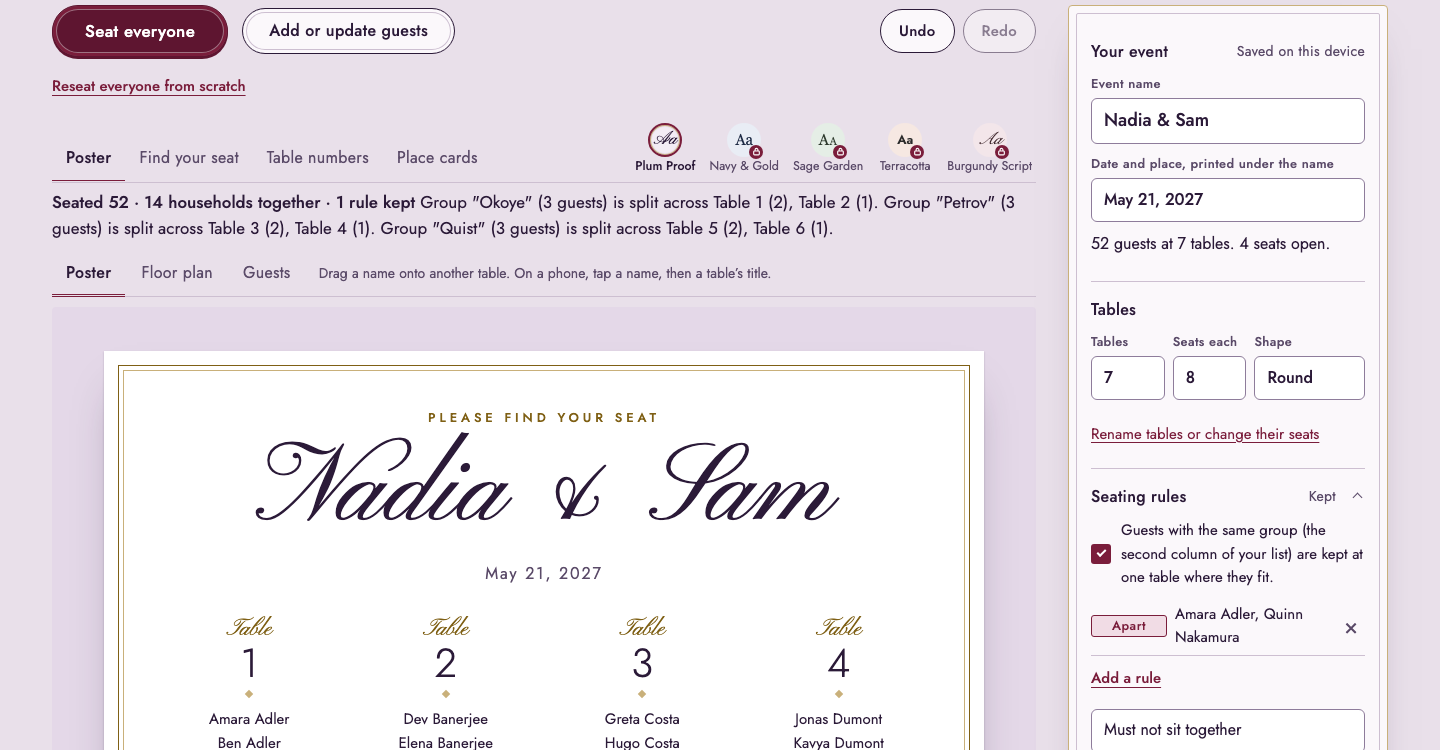
The reason many couples look for something other than a drag-and-drop chart is the work of the first draft. Here you paste the list, press Seat guests, and every household that fits is at one table. The screenshot is a test with 52 made-up guests at 7 tables of 8, with one “must not sit together” rule between two guests. The line above the poster says how many households were kept together and how many rules were kept, and names the groups that were split because a table was full.

Which one to use
- Use WeddingWire if your RSVPs and guest list already live there and you want the chart in the same account.
- Use this planner if you do not want an account, your list is in a spreadsheet, you want the first draft made for you, or you have people who must be kept apart.
- Use both: seat the guests here, then type the final tables into WeddingWire if you want them next to your RSVPs.
Weighing another planner? The Zola seating chart page does the same comparison. Once seated, the wedding seating chart sign page shows how to print the poster, and the planner is free to try. Prices and the refund policy are on pricing.
Frequently asked questions
WeddingWire says so: its seating chart page calls the tool “totally free”. We read that on an Internet Archive copy saved on 19 September 2026, because WeddingWire’s own page refused our request on 22 October 2026. Check the live page before you rely on it.
The archived page has a sign-up form (name, email, wedding date and “Create account”) above the tool, and the tool works from your WeddingWire guest list, so plan on an account. This planner needs none: paste a list and go.
The page we read describes dragging guests from your list into seats and does not mention automatic seating or rules such as keeping two guests apart. We could not open the tool itself, so look inside it. This planner seats everyone in one click and applies “must sit together” and “must not sit together” rules.
Copy the names from any spreadsheet or list, one guest per line, and paste them in; the planner reads name, group, tag and meal columns. We have not tested a file exported from WeddingWire, so if its columns are not recognised, the import preview lets you say which column is which.
Open “Add a rule”, choose “Must not sit together”, pick the two names and seat everyone again. If the rule cannot be met it is listed under “Needs a look” instead of being dropped without a word.
No. The list, the tables and the PDFs are made in your browser and saved on this device. The price of that is that the plan is not synced between devices: save the project file to open it somewhere else.