Wedding seating chart template for Excel
Set up the sheet once, with the columns a seating tool can read. Then seat it by hand in Excel, or paste it into the planner and get a chart, a poster and a CSV with table numbers back.
What other pages offer, read on 22 October 2026: a step-by-step post from Wedding Dream Planner that sets up the sheet with table, seat, group and notes columns and sells a bundle that includes a ready-made one, and Excel Templates, which has a downloadable one. We did not download either.
When an Excel seating chart is enough
A spreadsheet is free, you already own it, and a partner can open the same file. For ten tables of friends it works. The trouble starts when the list moves: nothing in a sheet tells you that a table has nine people at an eight-seat table, or that two guests who must not meet are side by side. You also see rows, not a room, so the sign and the place cards are a second job. That second part is what the planner adds.
Set up the sheet with five columns
One guest per row, with a header row on top. The planner reads the header words below; use any of them.
| Column | Header words it recognises | What it does |
|---|---|---|
| Name | Name, Guest, Guest name, Full name, Attendee | The only required column. Or use First name and Last name columns. |
| Group | Group, Household, Family, Party | Guests with the same value are kept at one table where they fit. |
| Tag | Tag, Side, Label | A free label such as Bride or Groom. Kept in the project and the CSV; it does not change the seating. |
| Meal | Meal, Meal choice, Diet, Menu | Printed on place and escort cards with the Event Pass or the Planner, and kept in the CSV. |
| RSVP | RSVP, Attending, Response | A row that says No or Declined is left out unless you tick “Include them”. |
If you want a ready-made start, press “Download template CSV” under the paste box in the planner: it has the columns name, group, tag and meal and three example rows, and opens in Excel. Put the household in the Group column. It is the one column that changes the seating, because a household is kept at one table where it fits.
Paste the sheet into the planner
Select the cells in Excel or Google Sheets, copy, and paste into the guest box. We tested a sheet of 36 rows with six columns (name, household, side, meal, a table column filled in by hand, and RSVP), one guest answering No. The preview shows what it found before anything is added:
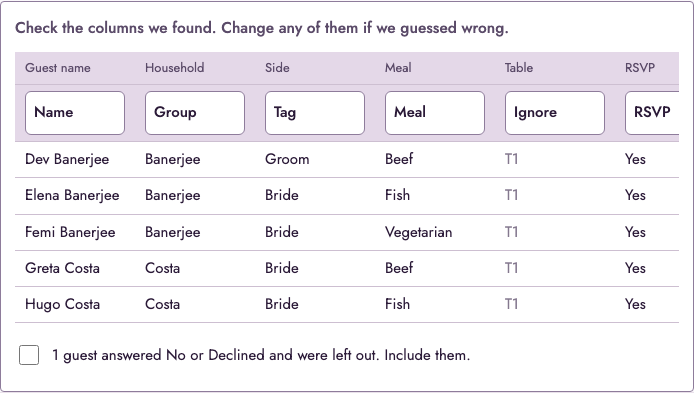
Then press Seat guests. In the test, 35 guests in 12 households were seated at 5 tables of 8, and 11 of the 12 households sat at one table.

Get a spreadsheet back, with table numbers
Press “Download CSV”. It has the columns name, group, tag, meal and table, one row per guest. These are the first rows from the test:
name,group,tag,meal,table
Dev Banerjee,Banerjee,Groom,Beef,Table 1
Elena Banerjee,Banerjee,Bride,Fish,Table 1
Femi Banerjee,Banerjee,Bride,Vegetarian,Table 1
Greta Costa,Costa,Bride,Beef,Table 2Open it in Excel or Google Sheets to sort by table, or send it to the caterer. The place cards and the poster come from the same list.
What does not come back: tables you assigned yourself
The planner does not read a column of table numbers. If you have already seated everyone in Excel, the Table column is ignored, as in the picture above, and the guests are seated again by the planner. Drag the names that should be elsewhere, or keep Excel as the master.
Excel or a seating planner
- Stay in Excel if the plan is small, finished, and nobody needs a poster.
- Use the planner if the list is long, still changing, or needs a first draft with families together. Want the look of a designed sign? See the Canva template page.
Frequently asked questions
We do not offer an .xlsx file. What the planner gives you is a template CSV with four columns (name, group, tag, meal) and three example rows: press “Download template CSV” under the paste box. The columns on this page are the same ones, so a sheet you build from this page pastes in as it is.
Yes. Select the cells, copy and paste them into the box. Cells copied from a spreadsheet arrive separated by tabs, and the planner reads them that way. Before anything is added you see the columns it found and can change any of them.
No. The planner does not read a column of table numbers: in our test the preview showed such a column as “Ignore”, and the guests were seated again from scratch. If your table plan is finished in Excel, keep Excel as the master. Place cards are the exception: the place cards page takes lines of “name, table” as you wrote them. The poster and the A to Z list need the planner’s own seating.
Press “Download CSV”. The file has one row per guest and the columns name, group, tag, meal and table; guests without a table have an empty table cell. Open it in Excel or Google Sheets.
There is no limit on guests. A project can have up to 100 tables of up to 40 seats each.
No. Pasting and seating happen in your browser and nothing is uploaded.