Skip to content

Seating chart generator

Paste your guests, pick your tables, and the chart sets itself. The chart you edit is the one that prints. Works on your phone.

Start your seating chart

Free. Unlimited guests. No sign-up. Nothing uploaded.

Keep divorced parents apart and families together: one “must not sit together” rule and a household column does it.

A floor plan from the planner: 24 sample guests seated at round tables, each table listing its guests

Start with your guest list

Paste straight from Google Sheets or Excel, or upload a CSV. One guest per line; a household, a tag and a meal can follow in more columns. Before anything is added you see the columns we found and can change them.

Drag a name onto another table. On a phone, tap a name, then a table’s title.

Print without the watermark

Free downloads carry a small line, “Made with seating-chart-generator.com”. The Event Pass takes it off and adds the print pack.

Want more? Seating Chart Generator adds the paid features.

Billing period

Free

Plan the whole room, with no limit on guests.

US$0 forever

You're on Free

No account, nothing to install

Planner

For planners who seat guests for several events.

US$12.90 /month

billed every month

Cancel any time · 14-day refund

US$79 /year

≈ US$6.58/month, billed yearly

Cancel any time · 14-day refund

The free version stays free. See pricing.

Have a license key?

One payment of US$14.90 covers one event. Planner is US$79 for a year; six Event Passes cost US$89.40.

  • No watermark on any download.
  • Posters in 24 × 36 in, A2 and A1 as well as 18 × 24 in.
  • Place cards and escort cards for every guest (free: the first sheet), with no watermark and each guest’s meal printed on the card.
  • Card sheets without crop marks, for pre-cut 2 × 5 card stock.
  • Four colour and font styles for posters, table numbers and cards.
  • One click to build every print file again after the list changes.
  • Five advanced seating rules: closeness scores, neighbouring tables, head and kids tables, table traits and seats side by side.

Prices are in US dollars. Planner: access until the end of the paid period; Waffo emails a reminder 3 days before each renewal. Cancel any time yourself in the customer portal of Waffo, our merchant of record: open pancake.waffo.ai/consumer/portal/login, enter the email you paid with, open the sign-in link it sends you, and press Cancel. You do not need to write to us. You keep access to the end of the period you paid for. If anything goes wrong, email support@seating-chart-generator.com. 14-day refund: see pricing and the refund policy. Your list is saved in this browser while you check out.

What you can print from the chart

The poster on screen is the same layout the PDF prints: your event name, the date line, and every table with its names. The other tabs preview the other pieces.

What you can print from the chart
PieceSizesFreeEvent Pass
Seating poster18 × 24 in, 24 × 36 in, A2, A118 × 24 in, with watermarkAll four sizes, no watermark
Find your seatA to Z by surname, Letter or A4Yes, with watermarkNo watermark
Table numbers4 × 6 in, 5 × 7 inYes, with watermarkNo watermark
Place and escort cardsLetter or A4 sheets: 4 folded or 10 flat cards per sheetThe first sheet, to test alignment, with a watermark line in the sheet marginEvery guest, no watermark, meals printed, sheets without crop marks, four styles

Change the list and press download again, or, with the Event Pass, build every print file again with one click as one ZIP. Cards are made from the same list, so a name changed once is changed everywhere.

Not sure which poster size to print? The wedding seating chart sign page shows how large the names come out on each size, for 40 to 200 guests.
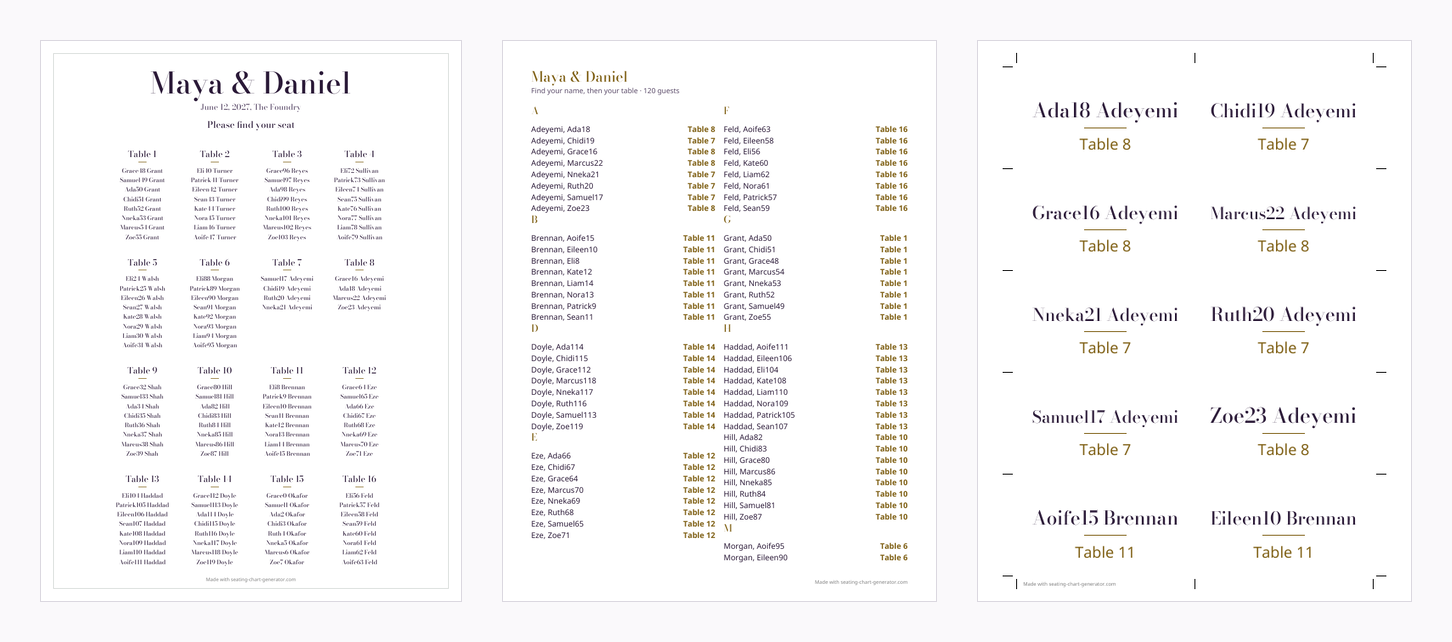
Three free print files from one sample guest list: the 18 × 24 in seating poster, the A to Z find-your-seat list and a sheet of escort cards
Free downloads from one 120-guest sample list: the poster, the find-your-seat list and the first sheet of escort cards.

Seat guests at round or long tables in three steps

  1. Set the tables. Choose how many tables, how many seats each takes and whether they are round or long. Most venues use rounds that seat 8 to 10, but check your venue’s numbers. You can rename any table or change its seats.
  2. Add rules if you need them. “Must sit together” and “Must not sit together” take two names each.
  3. Press Seat guests. If the tables are too few, the planner adds tables of the same size so that everyone has a seat, and tells you how many it added.

Then adjust by hand. Drag a name to another table, or use the Floor plan view to place the tables where they stand in the room and move names between them.

How to make a seating chart from a guest list

A seating chart answers one question for every guest: where do I sit? The slow part is not the drawing. It is keeping families together, keeping two people apart, and not leaving a table with one empty chair while another is full. This planner does that part for you. Start with the guest list you already have, press Seat guests, then move names by hand wherever the automatic result is not what you would do.

The plain definition, from Wikipedia’s article on the subject:

“A seating plan is a diagram or a set of written or spoken instructions that determines where people should take their seats.”

— Wikipedia, “Seating plan”

What to paste: one guest per line

Paste from a spreadsheet or an RSVP export, one guest per line, or upload a CSV. Only the name is required. Extra columns are matched by position, or by title when the first row is a header.

What to paste: one guest per line
ColumnWhat it doesExample
1. NamePrinted on the poster, the list and the cards.Ruth Okafor
2. GroupGuests with the same group are kept at one table where they fit.Okafor
3. TagA free label such as a side or a team. It is kept in the project and the CSV; it does not change the seating.Bride side
4. MealPrinted on place and escort cards with the Event Pass, and kept in the CSV.Vegetarian

The sample list under the paste box shows the format with 24 guests. A template CSV is one click away.

When the automatic seating needs your help

A perfect seating chart is a hard problem. Researchers who studied a commercial wedding planner put it this way:

“This problem is seen to be NP-complete from a number of different perspectives.”

— Lewis & Carroll, “Creating Seating Plans: A Practical Application”, Journal of the Operational Research Society, 2016

So no seating chart generator can promise the best chart for a large wedding in a second. This one finds a good answer fast and tells you where it could not meet a wish:

  • A group that is bigger than a table cannot sit together. The planner splits it, and the split shows under “Needs a look”.
  • Rules can contradict each other, for example two people who must sit together and each must be away from a third. The ones that cannot be met are listed.
  • Guests who do not fit anywhere stay in the “Not seated” tray, and guests without a table are left off the printed poster and cards.
  • Two guests with the same name look alike to the rules. Give them different names, such as “Chris A.” and “Chris B.”.
  • Letters that none of the included fonts cover, such as Arabic or emoji, are left out of the PDF. The CSV keeps them exactly.
  • Tap a name to see which of its rules the seat meets and which it does not.

Seating chart generator or a spreadsheet?

A spreadsheet is fine for ten guests. At a hundred, the problems start: moving one person means retyping two columns, and nothing warns you when a rule is broken. Here a move is one drag, the broken rules are marked at once, and the poster, the A to Z list and the cards come from one list. There is no account, nothing is uploaded, and you can use it as long as you like without paying. For a class, which needs rows and not tables, use the classroom seating chart. If your list already lives in a sheet, see how to set up an Excel seating chart template that pastes straight in.

Comparing seating chart tools

Using another tool already? We read their public pages and wrote down what each does and where this planner differs: the Zola seating chart (free for 15 guests), the WeddingWire seating chart, and a Canva seating chart template, which designs the sign but does not seat the guests.

What stays free and what the Event Pass adds

The whole seating chart is free, with no guest limit; free downloads carry a small watermark. The Event Pass is US$14.90, paid once, no automatic renewal, 90 days from purchase and adds the full print pack. See pricing, including the 14-day refund.

Latest pages

Frequently asked questions

Start your seating chart

Free. Unlimited guests. No sign-up. Nothing uploaded.

Your guest list stays in this browser and is never uploaded.